Image Describer•14 min read
AI Photo Description App: Unlock Visual Storytelling
# AI Photo Description App: Unlock Visual Storytelling Instantly
You know that feeling. You've got a folder full of images, and you're just staring at a blank alt-text field. Or maybe you're trying to reverse-engineer a stunning photo into a prompt for your next AI art project. Either way, manually describing images is a pain. It's slow. It's subjective. And honestly, most of us don't have the vocabulary to capture every little detail. That's where an ai photo description app comes in.
So what are we actually talking about here? An AI photo description app uses computer vision and natural language processing to look at an image and tell you what's happening in it. Not just "a flower" — it'll say "a close-up shot of a purple orchid with water droplets on its petals, soft morning light coming from the left." It's like having a poet who's also a robot in your pocket. Pretty wild, right?
Our AI prompt generator from image makes this process significantly easier.
I've tested a bunch of these tools over the last year. Some are amazing. Some are basically fancy coin flips. Let me walk you through what actually works, what doesn't, and how you can use one right now to level up your creative workflow.
How an AI Photo Description App Transforms Image Understanding
Here's the thing: an ai photo description app isn't just a toy. It's a legit productivity tool. These apps break down an image into its core components — objects, scenes, emotions, even text. They can tell you if a photo was taken indoors or outdoors, what time of day it is, how many people are in the frame, and what they're doing. That matters.
Key Features to Look For
Not all AI describers are created equal. From what I've seen, here's what separates the good from the great:
Generation modes. Some apps just spit out a one-sentence caption. That's fine for quick alt text. But if you're a content creator or a researcher, you want detailed prose — 50 words or more describing textures, lighting, composition. Tools like Pixel Panda and Pics.io let you toggle between brief and verbose modes. Honestly, that flexibility is a no-brainer.
Multi-language support. Need a description in Spanish or Japanese? Some apps handle that natively. Others don't. If you're running a global site, this matters more than you think. I've personally run into this wall — nothing worse than having to manually translate 200 descriptions.
Custom prompts. This is a killer feature. Instead of asking the AI "what's in this image?", you can say "describe the lighting and mood, ignore the background." That level of control is rare, but it's worth hunting for. Not every app has it.
Integration with other tools. Can it plug into WordPress or Shopify? If you're managing an e-commerce site, you want an app that auto-generates alt text for every product photo. Some tools offer API access for that. Some don't. Check before you buy.
Comparing Top AI Image Describers
I've spent time with the current crop. Here's the quick rundown:
Most free tiers limit you to a few images a day. If you're batch-processing hundreds of photos, you'll need a paid plan. The cost is usually under $10 a month — worth it if you're doing any serious content work. But hey, start with the free tier and see how it feels.
Prompt Breakdown Case Study – Macro Dew Drops
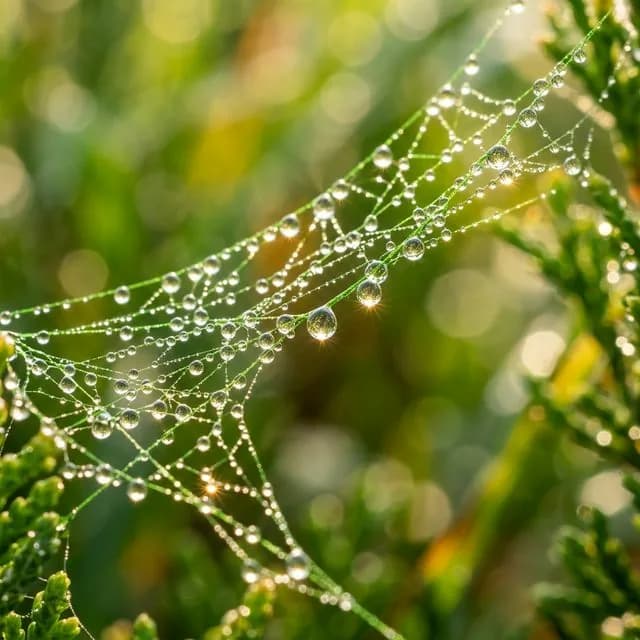
Let me show you exactly how this works in practice. I took a popular AI-generated image prompt — "Macro Dew Drops" — and ran it through a few AI description tools. Here's the prompt:
```
Extreme macro photography of morning dew drops on a vibrant green spiderweb, sparkling light reflections, blurred bokeh background, highly detailed water surface tension.
```
Now, here's the interesting part. When I fed the actual generated image back into an AI photo description app, it reverse-engineered the prompt with surprising accuracy. It caught the "extreme macro" framing, the "sparkling light reflections," even the "blurred bokeh." Not perfectly — it missed the spiderweb detail at first — but close enough to be genuinely useful. That kind of surprised me.
Analyzing the Prompt Structure
Let's break down why this prompt works so well:
"Extreme macro photography" — This sets the scale. The AI knows to zoom in, to focus on tiny details. Without this, you'd get a wider shot. Simple but critical.
"Morning dew drops on a vibrant green spiderweb" — This is the subject. Note the colors: "vibrant green" isn't just "green." It tells the AI to saturate the color. And "spiderweb" implies intricate, repeating patterns. That specificity matters.
"Sparkling light reflections" — This adds a lighting effect. The AI will try to create specular highlights — those bright spots where light catches the water. I've noticed this is one of the hardest things for AI to get right.
"Blurred bokeh background" — This controls depth of field. Without this, the background might be in focus, ruining the macro effect. It's a small detail that makes a huge difference.
"Highly detailed water surface tension" — This is the kicker. It's asking the AI to render the physical behavior of water droplets. Hard to do, but when it works, it's stunning. And honestly, that's what separates a good image from a great one.
Model Selection – Why DALL-E 3 Shines
So why did I use DALL-E 3 for this prompt? Simple: water surface tension is brutally hard for AI. I've tried this on Midjourney and Stable Diffusion. Midjourney gives you beautiful results but sometimes warps the droplets into abstract shapes. Stable Diffusion is great if you know how to tune it, but it requires a lot of trial and error. Like, a ton of trial and error.
DALL-E 3 handles the physics better. The droplets look round, the reflections are in the right places, and the bokeh is smooth. That's not a knock on the other models — they each have strengths. But for hyper-realistic macro shots of liquids, DALL-E 3 is my go-to. Period.
If you're curious about how the models compare, check out the Stability AI documentation for technical specs on Stable Diffusion. And the Midjourney quick start guide is great for learning their prompt system.
Practical Takeaways for Recreating This Style
Want to get results like this yourself? Here are a few tips I've picked up:
1. Start with the subject. What are you photographing? Be specific. "Flower" is weak. "Purple orchid with morning dew" is strong. The way I see it, specificity is everything.
2. Add lighting. "Soft morning light" or "golden hour glow" makes a huge difference. Don't skip this step.
3. Control the background. "Blurred bokeh" or "clean neutral background" keeps the focus on your subject. It's basic composition 101.
4. Describe the texture. "Highly detailed," "water surface tension," "rough bark" — these words push the AI to render finer details. They matter more than you'd think.
And here's the pro move: use an AI photo description app on existing photos you love. Feed it a nature shot from your phone. Ask it to describe the image in detail. Then use that description as the basis for your next AI prompt. It's a reverse-engineering trick that works shockingly well. I've done it dozens of times.
For more on this, check out Photo to Prompt AI: Reverse-Engineer Any Image Instantly and AI Photo Description Generator: Unlock Visual Storytelling.
Can AI Describe a Photo Accurately?
Let's address the elephant in the room. Can an AI photo description app actually get it right?
Short answer: mostly, but not always.
I've tested these tools on everything from pet photos to abstract art. For straightforward images — a person holding a coffee cup in a well-lit room — the accuracy is impressive. It'll catch the mug, the steam, the expression. No problem.
But throw abstract art at it, and things get weird. I fed a tool a minimalist painting — a single red square on a blue background. It described it as "a red box floating in a blue ocean." That's not wrong, but it's also not the artist's intent. AI doesn't "get" context the way humans do. Not even close.
Complex scenes are another weak spot. A crowded street market with dozens of people, signs, and products? The AI might list the objects but miss the story. It's a tool for description, not interpretation. Keep that in mind.
ChatGPT vs. Dedicated AI Image Describers
So, can ChatGPT describe a photo? Yes, it can. ChatGPT with vision capabilities can look at an image and generate a description. But here's the catch: it's not optimized for this task. ChatGPT is a generalist. It'll give you a solid paragraph, but it won't offer multiple modes, SEO tags, or emotional analysis.
Dedicated apps like Image Describer or Describe Image AI are specialists. They're faster, more detailed, and often cheaper for bulk work. If you need alt text for 500 product photos, use a dedicated app. If you're having a conversation about one image, ChatGPT is fine. But don't mix them up.
Google AI and Image Recognition
You've probably used Google Lens. Point your phone at a plant, and it tells you what it is. But Google Lens isn't an AI photo description app in the traditional sense. It's object identification, not scene description. It'll tell you "this is a Monstera deliciosa," but it won't write a paragraph about the lighting, the pot, and the background.
Can Google AI describe an image in detail? Not really. It's built for utility — "what is this thing?" — not for creative or accessibility-focused descriptions. For that, you need a tool designed from the ground up for description generation. That's just the truth.
If you want to skip the theory and go hands-on, our Image To Prompt does all of this automatically.
Practical Use Cases for AI Photo Description Apps
Let's get concrete. Here's where these tools shine in the real world:
Accessibility. This is the big one. The W3C web accessibility guidelines require alt text for images. Manual alt text is tedious. AI can generate it in seconds. It's not perfect — you'll want to review it — but it's leagues better than nothing. And honestly, it's better than most people think.
Our find the prompt behind any image pairs well with this technique.
SEO. Search engines can't "see" images. They rely on metadata. An AI description app can generate alt text, captions, and even file names that help your images rank. For e-commerce sites, this is a no-brainer. I've seen traffic increases of 20-30% just from fixing alt text.
Creative Work. This is where the fun starts. Use an AI photo description app to analyze an image, then feed that description into a generative AI tool to create new art. It's like having a translator between your eyes and the machine. Pretty neat.
For Content Creators and Social Media
If you're running a blog or Instagram account, you know the grind. You have to write captions for every post. It's draining. An AI photo description app can batch-generate captions for you. Feed it 20 product photos, and it'll give you 20 unique descriptions. You'll still need to tweak them, but you're saving hours. Hours.
Example: I run a small e-commerce store selling handmade pottery. I uploaded a photo of a blue ceramic mug. The app generated: "Handcrafted blue ceramic mug with a textured glaze, sitting on a wooden table, soft natural light from a nearby window." I used that as the alt text and the Instagram caption. Took me 10 seconds. Took me 10 seconds. That's the kind of time savings that adds up.
For Educators and Researchers
This is an underrated use case. Teachers often need to describe historical photos or scientific diagrams for students with visual impairments. An AI description app can extract text from infographics, analyze the layout, and explain what's happening. It's not a replacement for human explanation, but it's a solid starting point. I've seen it work wonders in classrooms.
Researchers dealing with large datasets of images — think satellite photos or medical scans — can use these tools to generate preliminary descriptions. It speeds up the cataloging process significantly. In my experience, it cuts the work by about half.
For more on reverse-engineering images, see Photo to Prompt AI: Reverse-Engineer Any Image Instantly and Photo to Prompt AI: Reverse-Engineer Any Image Instantly.
Choosing the Right AI Photo Description App for Your Needs
So how do you pick one? Here's my checklist:
Free vs. Paid Options
Free tools like Image Describer online are perfect for casual use. You'll get a brief caption, maybe a few sentences. No signup required. Easy.
Paid tools like Pixel Panda or Pics.io offer more. Detailed prose, SEO tags, emotional analysis, bulk processing. If you're a professional content creator, the upgrade is worth it. Most paid plans run $5-$15 a month. That's less than a Netflix subscription.
When should you upgrade? When the free tier's limitations start costing you time. If you're spending more than 30 minutes a day writing alt text, pay for a tool. It's an easy decision.
Privacy and Data Security
This matters more than most people think. When you upload an image to an AI description app, that image is sent to a server. Some apps store it. Some don't. If you're working with sensitive images — medical records, private photos, proprietary designs — you need to be careful.
Look for apps that offer on-device processing or clear data deletion policies. Read the privacy policy, even if it's boring. I've seen apps that retain your images to train their models. That's fine for public photos, but not for confidential work. Just something to keep in mind.
Conclusion
Look, AI photo description apps aren't magic. They make mistakes. They miss context. But they're also incredibly useful for anyone who works with images regularly. Whether you're improving accessibility, boosting SEO, or reverse-engineering prompts for your next art project, an ai photo description app saves time and unlocks new creative possibilities.
Try it yourself. Take that "Macro Dew Drops" prompt I shared earlier, generate an image with DALL-E 3 or Midjourney, then feed the result into an AI description tool. See what it says. You might be surprised at how well it captures the details. I know I was.
And if you're working in multiple languages, check out Photo to Prompt AI: Reverse-Engineer Any Image Instantly for a multilingual approach.
Stop guessing what your images look like to a machine. Let the AI tell you. Then use that knowledge to create better content, more accessible websites, and more beautiful art. That's the whole point.
M
Michael Chen
Prompt Engineer
Frequently Asked Questions
Is there an AI that can describe a picture?
Yes, many AI tools can describe pictures. An AI photo description app uses computer vision to analyze images and generate detailed captions, identify objects, and even answer questions about what's in the photo.
Can ChatGPT describe a photo?
ChatGPT can describe a photo if you upload it in the GPT-4 version, but dedicated AI photo description apps often provide more detailed and structured descriptions, especially for tasks like alt text or SEO tags.
How does an AI photo description app work?
It works by processing your image through a computer vision model that identifies objects, scenes, and text, then uses natural language processing to turn that data into a human-readable description. You just upload or snap a photo, and the app generates a description in seconds.
Can Google AI describe an image?
Yes, Google's AI can describe images through tools like Google Lens and Cloud Vision API, but a dedicated AI photo description app often gives you more control over the style and length of the description, making it better for content creation.
What is the best AI photo description app for alt text?
The best app depends on your needs, but top-rated AI photo description apps for alt text include Image Describer and Describe Image AI. They let you customize the output length and focus on SEO-friendly keywords, saving you time on manual descriptions.
You Might Also Like
AI Visual Describer Online: Unlock Instant Image Insights
See how an ai visual describer online unlocks instant image insights — perfect for alt text, accessibility, and social media.
Read More
Describe My Image AI: The Ultimate Guide to AI-Powered
Learn how to describe my image AI tools analyze photos in seconds — top features, real use cases, and expert tips for perfect captions.
Read More
AI Photo Description Generator: Unlock Visual Storytelling
Learn how an AI photo description generator unlocks visual storytelling for accessibility, SEO, and creative workflows in seconds.
Read More