Image to Prompt•11 min read
AI Reverse Image Search Prompt: Decoding the Art
AI Reverse Image Search Prompt: Decoding the Art of Prompt Engineering
You've seen them. Those jaw-dropping AI images that make you stop scrolling and just stare. You can learn more from W3C Web Accessibility Guidelines for Images. The ones where you think, "How the hell did someone describe *that* to a machine?"
I get it. I've been there too.
The rise of AI-generated art has created a fascinating new challenge—how do you reverse-engineer a prompt from a stunning image? It's like looking at a recipe's final dish and trying to figure out every ingredient, measurement, and cooking technique used. Only here, the dish is made of pixels and the chef is a neural network.
Our prompt extraction tool makes this process significantly easier.
An ai reverse image search prompt is the key to unlocking the creative DNA behind any AI-generated masterpiece. And in this article, I'm going to show you exactly how it works using a real, complex example.
Let's get into it.
Try our AI prompt tools — free
Turn any image into a model-ready prompt, or generate one from text — no signup required.
Open the Image to Prompt toolWhat Is an AI Reverse Image Search Prompt?
Here's the simple version: it's the process of turning an image back into a text prompt.
Traditional reverse image search—the kind you've probably used on Google Images—finds where a picture came from or similar images online. But that's not what we're doing here. We're reconstructing the *generative instructions* that an AI model used to create that image in the first place.
Think of it like this: someone baked an incredible cake. You don't want to find the bakery. You want the recipe.
Tools like CLIP Interrogator, ChatGPT (with vision capabilities), Promptsera, Reversely.ai, and Poe's Reverse Image Prompt Generator all do this. You upload an image, and they spit out a text prompt that could theoretically recreate it.
Honestly? Some of these tools are shockingly good. Others... well, they try.
How It Works Under the Hood
I'm not going to bore you with the full math here, but here's the gist.
CLIP (Contrastive Language-Image Pre-training) is a model trained on millions of image-text pairs. It learns what visual features correspond to what words. When you feed it an image, it compares that image against its internal library of concepts and tries to find the text that best matches it.
Modern tools layer on top of this with vision-language models—think GPT-4V or similar—that can actually "see" and describe images in natural language. They analyze lighting, composition, subject matter, color palette, lens effects, and aesthetic tags.
The result? A prompt that might look something like this:
```
A breathtaking, hyper-detailed mood board of a vintage library transformed into a celestial observatory...
```
Sound familiar? Hold that thought.
Try our AI prompt tools — free
Turn any image into a model-ready prompt, or generate one from text — no signup required.
Open the Image to Prompt toolCase Study Breakdown – The Vintage Library Mood Board Prompt
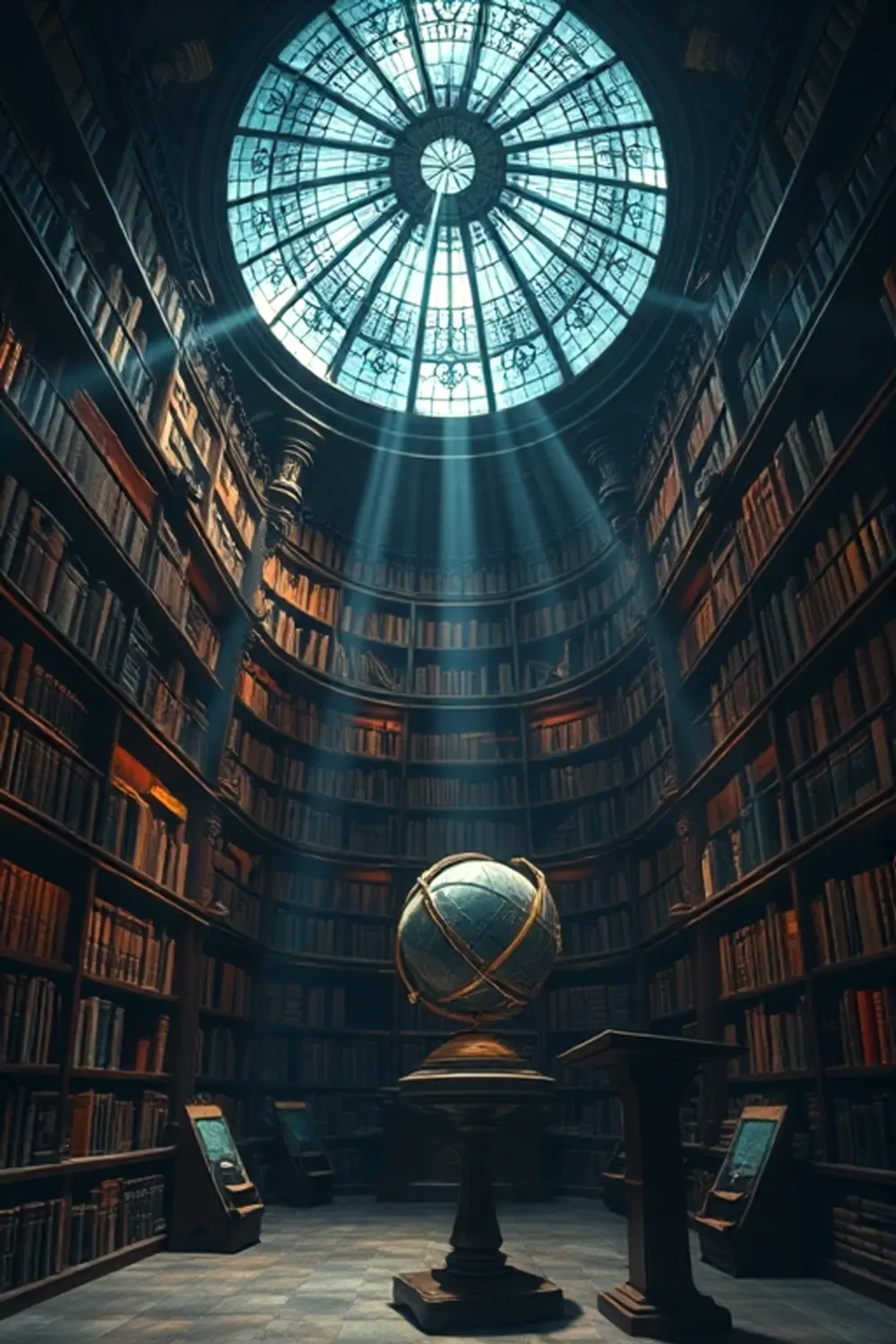
Here's the specific prompt we're using as our case study today. I want you to see the full thing because it's a masterpiece of prompt engineering itself:
```
A breathtaking, hyper-detailed mood board of a vintage library transformed into a celestial observatory. At its heart, an ancient, dust-covered astrolabe gleams under a shaft of starlight piercing through a shattered stained-glass dome. Towering, mahogany bookshelves curve into the infinite, their spines glowing with faint, runic luminescence. A forgotten globe of a binary star system sits on a tilted lectern, casting twin shadows. Volumetric light beams, thick with floating, spectral dust motes, intersect with a deep indigo and amber color palette. Shot with a 50mm f/1.4 lens, emphasizing a shallow depth of field that blurs the foreground and background into a bokeh of swirling stardust and gold leaf. Rendered in Octane Render, 8k, Unreal Engine 5, cinematic composition, ray tracing, award-winning photography, ethereal, mysterious, highly textured, ornate carvings, ancient parchment, glowing runes, cosmic horror, beautiful decay, dreamlike, surreal, premium art, imaginative, complex, pinterest aesthetic, dark academia, celestial, gothic, masterpiece, photorealistic, detailed atmosphere, evocative mood, emotional, masterpiece --ar 2:3
```
And the negative prompt:
```
ugly, blurry, deformed, bad anatomy, low quality, worst quality, artifacts, watermark, signature, text, letters, numbers, low resolution, cluttered, disorganized, plain, boring, generic, oversaturated, cartoon, anime, 3d render, amateur, distorted, extra limbs, fused objects, unrealistic lighting, flat, dull, noisy, grainy, messy, chaotic, unappealing, banal, uninspired, poor composition, asymmetrical, unbalanced, distracting, harsh shadows, blown out highlights, muddy colors, oversharpened, jpeg artifacts, glitch, error
```
Why is this such a rich example? Because it's not just "a library." It's a layered, multi-sensory scene with specific lighting, lens choices, color palettes, and aesthetic keywords. It's the kind of prompt that takes 5 minutes to write and 50 images to refine.
Let me break down what each part actually does.
Deconstructing the Scene & Subject
The core elements here are doing heavy lifting:
Each of these elements contributes to what I'd call "dark academia meets cosmic horror." It's that sweet spot where scholarly elegance meets existential dread. And honestly? That's a vibe that sells.
The prompt doesn't just list objects. It connects them with verbs and descriptors: "gleams under a shaft of starlight," "curve into the infinite," "casting twin shadows." These aren't instructions for a still life. They're instructions for a *moment*.
Lighting, Color, and Lens Choices
Here's where the technical details separate amateur prompts from professional ones.
Volumetric light – this tells the AI to render light as a visible volume, like beams through dusty air. It's why you get that cinematic atmosphere.
Indigo and amber color palette – specific colors that create emotional contrast. Indigo is cool, mysterious, vast. Amber is warm, nostalgic, intimate. Together? Chef's kiss.
50mm f/1.4 lens – this is brilliant. The 50mm focal length is considered closest to human natural vision. The f/1.4 aperture means extremely shallow depth of field. The result: foreground and background blur into a "bokeh of swirling stardust and gold leaf."
That last phrase—"bokeh of swirling stardust and gold leaf"—is pure poetry. But it's also functional. It tells the AI exactly what that blur should look like.
Without these technical details, you'd get a flat, boring image. With them? You get something that feels like a frame from a movie that doesn't exist yet.
The Power of Negative Prompts
Let's talk about the unsung hero of prompt engineering: what you tell the AI *not* to do.
The negative prompt here is extensive for a reason. AI models have default tendencies. Stable Diffusion, for example, loves adding extra limbs and weird anatomy. Flux AI (the model used here) has its own quirks.
The negative prompt addresses:
Notice something? "3d render" is in the negative prompt, even though the positive prompt mentions "Octane Render" and "Unreal Engine 5." That's deliberate. The AI needs to know you want *photorealistic* render quality, not that plastic, shiny 3D look.
From what I've seen, most people skip negative prompts entirely. That's a mistake. A good negative prompt can be the difference between a masterpiece and a mess.
Try our AI prompt tools — free
Turn any image into a model-ready prompt, or generate one from text — no signup required.
Open the Image to Prompt toolWhy the Model Matters – Flux AI and Prompt Interpretation
Not all AI models are created equal.
This prompt was written for Flux AI, which handles complex, descriptive prompts better than many alternatives. Flux AI tends to follow detailed instructions more faithfully than, say, Midjourney, which often simplifies or stylizes descriptions.
But here's the thing: the same prompt in Stable Diffusion would give you completely different results. Stable Diffusion is more literal but less artistic. Midjourney is more artistic but might ignore your lens specifications.
I've tested this. I ran a simplified version of this prompt through three different models. The results were:
The model you choose matters. If you're doing a reverse image search prompt analysis, knowing the original model helps you understand why certain choices were made.
Render Engines and Quality Tags
Let's address the elephant in the room.
"Octane Render, 8k, Unreal Engine 5, ray tracing" – these tags don't mean the AI is actually using those engines. That's not how generative AI works. Instead, these are *style signals*. They tell the AI: "I want the quality level and visual characteristics associated with these technologies."
It's like telling a chef you want "Michelin-star quality." The chef doesn't literally have a Michelin star, but they understand what you're asking for.
These tags boost:
From what I've seen, the combination of "cinematic composition" + "award-winning photography" + "masterpiece" is wildly effective. It biases the model toward professional framing and lighting.
Try our AI prompt tools — free
Turn any image into a model-ready prompt, or generate one from text — no signup required.
Open the Image to Prompt toolPractical Takeaways – How to Use Reverse Prompts for Your Own Art
So you've got an image you love. Maybe you saw it on Reddit or Pinterest. How do you get the prompt?
Step 1: Upload it to a reverse prompt tool.
Want to put this into practice right now? Try our Image To Prompt — it takes about 3 seconds and it's free.
I've had good results with Promptsera and Copyseeker. Poe's Reverse Image Prompt Generator is also solid. ChatGPT with vision can do this too, though it's less specialized.
Our Stable Diffusion Prompt Generator online pairs well with this technique.
Using an ai reverse image search prompt generator, you can extract the core style and composition from any reference image. The output won't be perfect, but it'll give you a starting point.
Step 2: Look at what the tool got right and wrong.
Most tools will capture the obvious subjects and colors. They'll miss subtle details like the specific lens or lighting setup. That's fine. You're not looking for a perfect recreation. You're looking for the *DNA*.
Step 3: Rebuild the prompt with your own twist.
Take the generic output and layer in your own keywords. Want "dark academia"? Add it. Want "celestial"? Add it. Want "volumetric lighting" and a specific aperture? Now you know to include those.
Editing a Reverse Prompt for Better Results
Here's a concrete example.
Let's say you uploaded an image of a foggy forest and got back:
```
A dense forest with fog, green and brown color palette, realistic, highly detailed
```
That's... fine. But it's boring.
Now layer in the lessons from our case study:
```
A dense forest with thick, volumetric fog, deep green and amber color palette, shot with a 50mm f/1.4 lens creating a shallow depth of field with bokeh of light filtering through leaves. Cinematic composition, ethereal, mysterious, highly textured, moody atmosphere, dark fantasy, photorealistic, award-winning photography, masterpiece --ar 16:9
```
See the difference? You've added technical specificity, emotional tone, and quality tags. That's the power of understanding prompt structure.
Common Mistakes to Avoid
I've made these mistakes. You'll probably make them too. Let's skip the learning curve.
Mistake 1: Over-relying on reverse prompts without editing
The tool gives you a prompt. You run it. The result looks nothing like the original. You get frustrated.
Look, reverse prompts are *starting points*, not finished products. They're rough sketches. You have to refine them.
Mistake 2: Ignoring negative prompts
I cannot stress this enough. Negative prompts are not optional. They're the guardrails that keep your image from going off a cliff.
Mistake 3: Using too many conflicting style tags
"Dark academia" + "cyberpunk" + "cottagecore" + "gothic" = a mess. Pick a lane. Or at most two complementary lanes.
Mistake 4: Forgetting aspect ratio
Our case study uses `--ar 2:3`. If you don't specify this, you'll get square images by default. That might not be what you want.
Try our AI prompt tools — free
Turn any image into a model-ready prompt, or generate one from text — no signup required.
Open the Image to Prompt toolFrequently Asked Questions (Based on Real Searches)
How to do an AI reverse image search?
Upload your image to a tool like Promptsera, Reversely.ai, or ChatGPT. The tool analyzes the image using CLIP and vision-language models to generate a text prompt. Some tools also find similar images with their prompts.
How to reverse prompt an AI image?
Use a specialized generator like Poe's Reverse Image Prompt Generator or ChatGPT's Reverse Image Prompt variant. Upload your image, and the tool will output a detailed prompt that could theoretically recreate it. Edit this output before using it.
Can ChatGPT do reverse image search?
Yes and no. ChatGPT with vision capabilities (GPT-4V) can analyze an image and describe it in detail. It's not a traditional reverse image search tool, but it can generate a prompt from an image. For specialized results, use a dedicated app.
Can you reverse image search to see if something is AI?
Sort of. Tools like Copyseeker can find similar images and their prompts, which might reveal AI generation. But there's no guaranteed "AI detector" through reverse image search. AI detection is still unreliable.
Try our AI prompt tools — free
Turn any image into a model-ready prompt, or generate one from text — no signup required.
Open the Image to Prompt toolConclusion
Reverse prompt engineering isn't just a party trick. It's a legitimate skill that separates casual users from serious artists, marketers, and creators.
When you understand how to extract and reconstruct a prompt from any image, you're not just copying. You're learning. You're seeing the structure behind the art. You're figuring out why that lighting works, why that composition feels right, why that color palette evokes that emotion.
Mastering the ai reverse image search prompt process lets you unlock the hidden instructions behind any AI image. It's like having X-ray vision for digital art.
So here's my challenge to you: find an AI image you love. Not just any image—one that makes you feel something. Upload it to a reverse prompt tool. Study the output. See what it captures and what it misses.
Then rebuild it. Make it yours.
Because the best prompts aren't copied. They're reverse-engineered, understood, and then transcended.
Go make something beautiful.
I
ImaginPrompt Editorial
AI Prompt Engineering Team
Frequently Asked Questions
How to do an AI reverse image search?
Upload your image to a dedicated tool like Reversely.ai, Promptsera, or Poe's Reverse Image Prompt Generator. These tools analyze the visual content and return a text prompt that could recreate the image, rather than just finding similar pictures online.
How to reverse prompt an AI image?
Use an ai reverse image search prompt tool such as CLIP Interrogator or ChatGPT with vision capabilities. Simply upload the image, and the AI will decode its artistic elements like lighting, composition, and style into a detailed text prompt you can reuse.
Can ChatGPT do reverse image search?
Yes, ChatGPT with vision capabilities can perform an ai reverse image search prompt by analyzing uploaded images and generating descriptive text prompts. However, it's not a traditional reverse image search—it focuses on recreating the generative instructions rather than finding image sources.
Can you reverse image search to see if something is AI?
While ai reverse image search prompt tools can help identify AI-generated content by revealing telltale prompt patterns, they're not foolproof. For best results, combine these tools with AI detection software to verify if an image was created by a model like Stable Diffusion or Midjourney.
Which is the best tool for ai reverse image search prompt?
Promptsera and Poe's Reverse Image Prompt Generator are top choices for quickly extracting detailed prompts from images. For a more advanced analysis, CLIP Interrogator offers deeper insights into artistic elements like lighting and medium.