Prompting•10 min read
Midjourney Prompts: The Complete Guide (2026)
Midjourney can produce breathtaking images — but only if your prompt speaks its language. Unlike Stable Diffusion, Midjourney doesn't want a list of tags; it wants a vivid sentence or two plus a few well-chosen parameters. This guide breaks down exactly how a Midjourney prompt is built, which parameters actually change your results, and how to turn any reference image into a Midjourney-ready prompt in seconds.
TL;DR: Describe your subject, environment, lighting and a camera or medium in 1–3 natural sentences, then add parameters like --ar 16:9 and --style raw. Skip generic words like 4k and photorealistic — Midjourney ignores them. Or skip the writing entirely: paste an image into the Midjourney prompt generator and it builds the prompt for you.
What makes Midjourney different
Midjourney has its own strong aesthetic and reads prompts as natural language. That changes how you write for it. A Stable Diffusion prompt is a weighted tag list; a Midjourney prompt is closer to a sentence a cinematographer might say. Two practical consequences follow: first, describing *specifics* (a particular light, lens, or material) steers the image far more than stacking adjectives; second, Midjourney's parameters — the `--` flags at the end — give you precise control that no amount of describing can replace.
The anatomy of a Midjourney prompt
A reliable Midjourney prompt has five descriptive parts followed by parameters:
See it in action: a real image to a Midjourney prompt
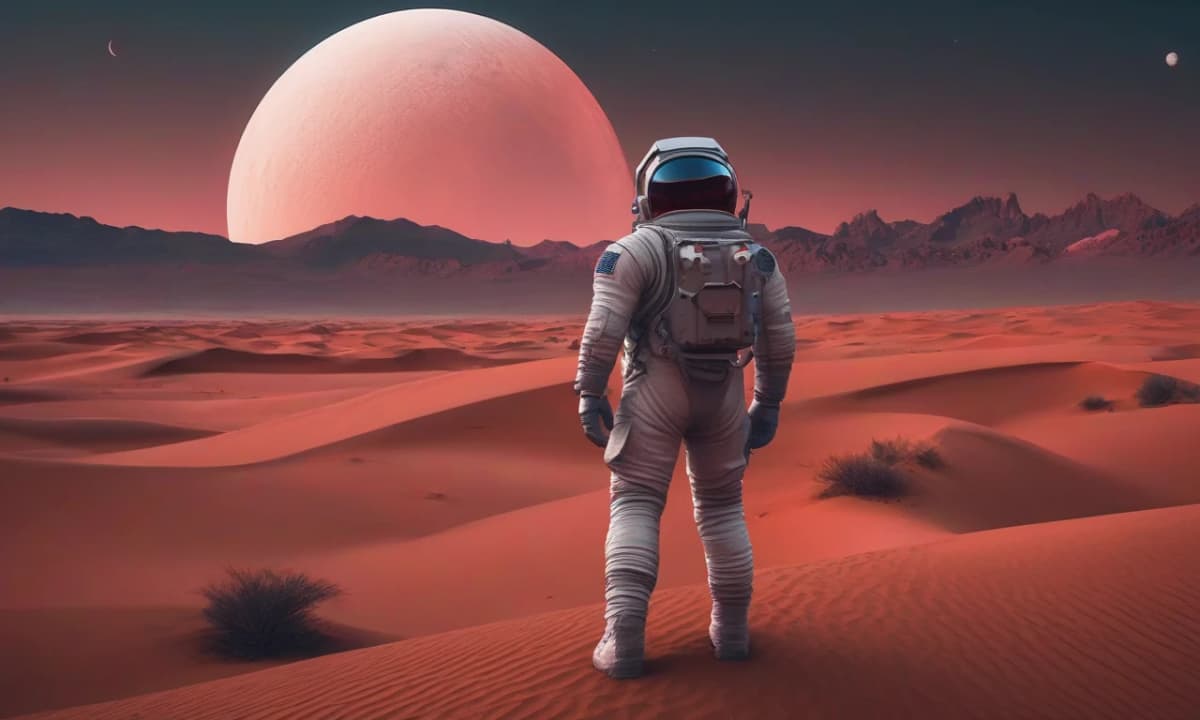
To show this concretely, we ran one image through the Image to Prompt tool in Midjourney mode and captured the output exactly as the tool returned it — a genuine, unedited result.
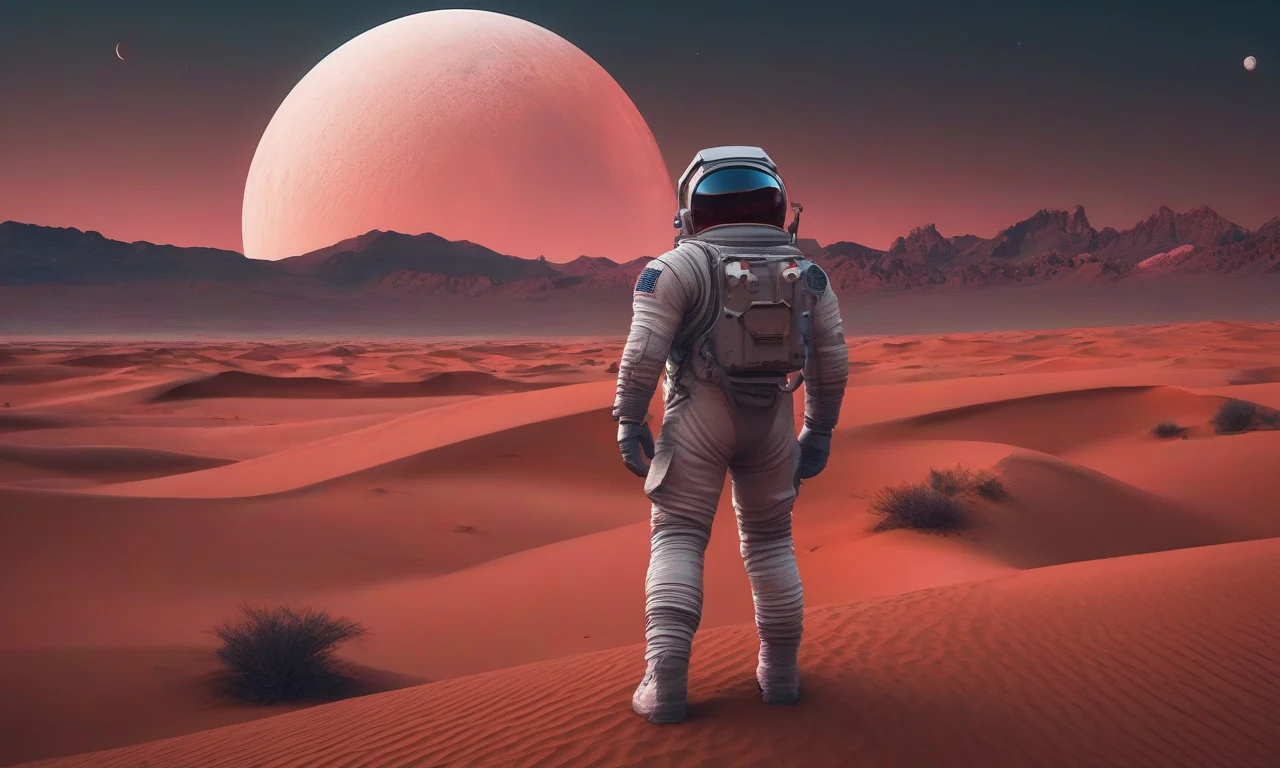
Here is the Midjourney prompt it produced, verbatim:
The astronaut stands at the edge of an alien landscape, bathed in the warm glow of a setting sun that casts long shadows across the rust-hued sand dunes. The sky above is ablaze with hues of crimson and gold, punctuated by the distant silhouette of jagged mountains that stretch towards the horizon. In the foreground, the astronaut's white spacesuit stands out starkly against the vibrant backdrop, its reflective visor glinting softly as it gazes out into the vast expanse. A small crescent moon hangs low in the sky to the left, casting an ethereal light over the scene. The overall effect is one of breathtaking beauty and otherworldly wonder, as if the very fabric of reality has been stretched thin to reveal the secrets of the cosmos. --v 6.0 --style raw --ar 16:9
Notice how it maps onto the anatomy above — that's not a coincidence, it's what a good Midjourney prompt looks like:
That last point is worth underlining: the tool read the image's proportions and added --ar 16:9 automatically. Match the parameter to your image and you save yourself a round of cropping.
The Midjourney parameters that actually matter
Parameters go at the very end of the prompt, each starting with `--`. These are the ones that change your results the most:
| Parameter | What it does | Typical use |
|---|---|---|
| --ar | Sets the aspect ratio | --ar 16:9 (cinematic), 1:1, 2:3 |
| --v | Chooses the model version | --v 6.1, --v 7 |
| --style raw | Dials back Midjourney's automatic styling for a more literal result | append --style raw |
| --stylize (--s) | How strongly Midjourney applies its own aesthetic | 0–1000 (default 100) |
| --chaos (--c) | How different the four initial options are from each other | 0–100 |
| --weird (--w) | Pushes toward unusual, experimental aesthetics | 0–3000 |
| --no | Excludes something from the image | --no text, --no blur |
| --sref | Matches the style of a reference image | --sref [image url] (--sw for weight) |
| --cref | Matches a character from a reference image (v6) | --cref [image url] (--cw); check docs for v7 |
| --tile | Generates a seamless, repeatable pattern | --tile |
A good default for photographic, true-to-life results is --style raw with a low --stylize (say `--s 50`). For more artistic, surprising output, raise --stylize and experiment with --chaos and --weird.
Style and character references
Two of Midjourney's most useful features take an image, not words. --sref [image url] tells Midjourney to borrow the *style* of a reference image (use --sw to control how strongly), which is the fastest way to keep a consistent look across a series. --cref [image url] does the same for a *character*, so the same person recurs across images (with --cw controlling how closely). Character referencing changed between versions, so confirm the exact syntax for your version in Midjourney's official documentation.
The four mistakes that ruin Midjourney prompts
Which version should you use?
Each Midjourney version follows prompts and renders detail a little differently, and the parameters above can behave slightly differently between them. Set the version explicitly with --v (for example --v 6.1 or --v 7) rather than relying on the default, and check Midjourney's documentation for what changed — it evolves with every release. Our tools target the widely-supported --v 6.0 --style raw baseline, which is a safe, literal starting point you can bump up once you know the look you want.
Turn any image into a Midjourney prompt
If you'd rather not write from scratch, let the tools do it. The Image to Prompt tool reads any reference image and returns a Midjourney-ready prompt (with the right --v, --style raw and an auto-matched --ar), and the dedicated Midjourney prompt generator builds one from a short description. Generate, paste into Midjourney, then refine one variable at a time.
Get a Midjourney prompt from any image — free. Upload a reference and the tool returns a Midjourney-ready prompt in seconds, no signup required. Open the Midjourney prompt generator →
Midjourney rewards specificity and punishes filler. Describe the scene like you mean it, set the three parameters that matter — --v, --style raw, --ar — and adjust one thing at a time. Do that, and the gap between the image in your head and the one on screen gets very small.
I
ImaginPrompt
Prompt Engineering Team
Frequently Asked Questions
What makes a good Midjourney prompt?
Midjourney reads natural language, not tag lists. The best prompts describe the subject, the environment, the lighting and a camera or medium in a couple of vivid sentences, then add a few parameters (like --ar and --style raw). Specific description beats a pile of quality words.
Is Midjourney free?
No — Midjourney itself requires a paid subscription; there is no permanent free tier. You can still plan and write Midjourney prompts for free using ImaginPrompt's tools, then paste them into Midjourney once you subscribe.
What is the best aspect ratio for Midjourney?
It depends on the use: --ar 16:9 for cinematic and desktop scenes, 1:1 (the default) for icons and social posts, 2:3 or 3:2 for portraits and prints, and 9:16 for phone wallpapers and stories. Set it with the --ar parameter.
Why do '4k' and 'photorealistic' make my Midjourney image worse?
Midjourney v6 and later largely ignore those generic quality words, so they add nothing and crowd out the real description that actually steers the image. Describe the scene, lighting and lens specifically, and add --style raw instead.
What does --style raw do?
It dials back Midjourney's built-in aesthetic 'opinion' so the result follows your words more literally — better for photographic, technical or true-to-reference images. Leave it off when you want Midjourney's more stylized, artistic default.
What is --stylize (--s)?
It controls how strongly Midjourney applies its own aesthetic, from 0 to 1000 (default 100). Low values stay close to your prompt; high values make the image prettier but less literal. Pair a low --s with --style raw for the most faithful results.
How do I keep a consistent character across images?
Use a character reference (--cref in v6, with --cw to control how strongly it copies) pointing to an image URL, and a style reference (--sref) to keep the look consistent. Character referencing is version-dependent, so check Midjourney's docs for your version.
Can I turn an image into a Midjourney prompt automatically?
Yes. ImaginPrompt's Image to Prompt tool has a Midjourney mode that reads any image and returns a Midjourney-ready prompt — including the right --v, --style raw and an auto-detected --ar that matches your image's shape.
Should I use Midjourney v6 or v7?
Newer versions generally follow prompts better and render more detail; older versions can have a look some people prefer. Set the version explicitly with --v, and check Midjourney's official docs for what each version changed, since behavior evolves with each release.