Prompt Engineering•11 min read
How to Write AI Image Prompts (2026 Guide)
Type a one-line idea into any AI image generator and you will usually get something competent, generic, and nothing like what you imagined. The gap is rarely the model — it is the prompt. This guide teaches a six-layer formula for writing prompts from scratch, then proves it on a single subject rendered three times with our own free generator: same engine, same settings, one layer of the formula added at each stage, every prompt and image shown exactly as produced. (Working backwards from an image you already like is a different skill — that one is covered in our image to prompt guide.)
Why most prompts underdeliver
An image model has to make hundreds of decisions to produce a picture: the light, the palette, the camera position, the era, the weather, the material of every surface. Your prompt makes some of those decisions; the model averages its training data for all the rest. A vague prompt is not punished — it is averaged. That is why one-line prompts produce stock-photo blandness: you made one decision and the model made the other few hundred. Writing a good prompt is simply making more of the decisions that matter to you, in words the model can act on.
The six layers of a working prompt
Almost every strong prompt, on every engine, is some arrangement of the same six layers. You will not always need all six — but when a render disappoints, the fix is almost always a missing layer, and this table tells you which one.
| Layer | What it decides | Example words |
|---|---|---|
| 1. Subject | What the image is of | a lighthouse, an elderly violinist, a ramen bowl |
| 2. Subject detail | What makes YOUR subject specific | weathered stone, red lantern room, steam rising |
| 3. Setting & time | Where and when | on a cliff edge at dawn, in a neon-lit alley at night |
| 4. Style & medium | What the picture pretends to be | cinematic photograph, watercolor, 3D render, film noir |
| 5. Lighting | The single biggest mood lever | golden-hour rim light, soft overcast, harsh neon glow |
| 6. Camera & composition | Viewpoint and framing | wide-angle from below, macro close-up, centered symmetry |
The formula: [subject] with [detail], in/at [setting & time], [style/medium], [lighting], [camera/composition]. Read your draft prompt against this once before rendering — the layer you forgot is usually obvious.
Watch the layers work: one subject, three prompts
To show what each layer actually buys you, we rendered the same subject three times with the free AI image generator on this site — identical engine and settings each time, so the only variable is the prompt. The prompts are quoted verbatim and the renders are untouched.
Stage 1 — bare subject:
an old lighthouse
an old lighthouse
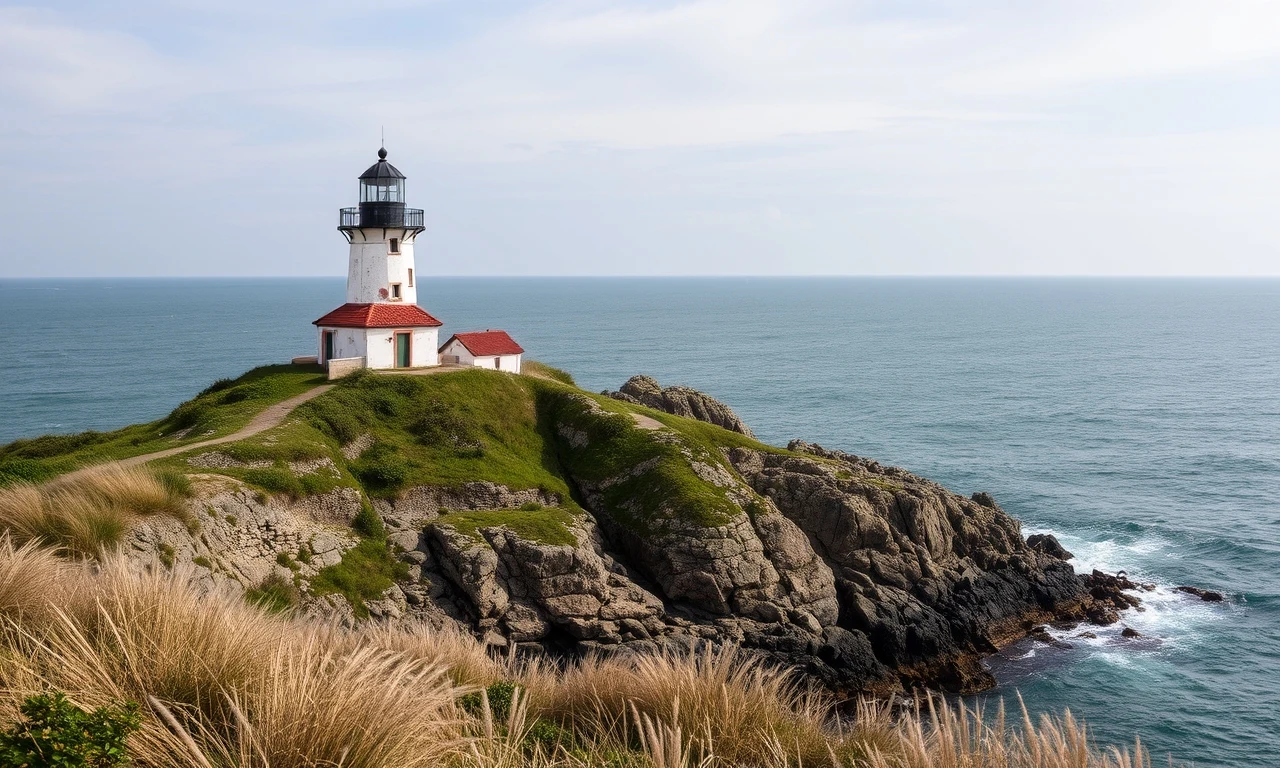
A perfectly fine image, and none of it is yours. Daytime, calm sea, white tower, mid-distance view — every one of those was the model averaging its idea of "lighthouse". If this is what you wanted, stop here. It almost never is.
Stage 2 — add subject detail + setting & time:
a weathered stone lighthouse with a red lantern room, standing on a rocky cliff edge at dawn, waves crashing on the rocks below
a weathered stone lighthouse with a red lantern room, standing on a rocky cliff edge at dawn, waves crashing on the rocks below
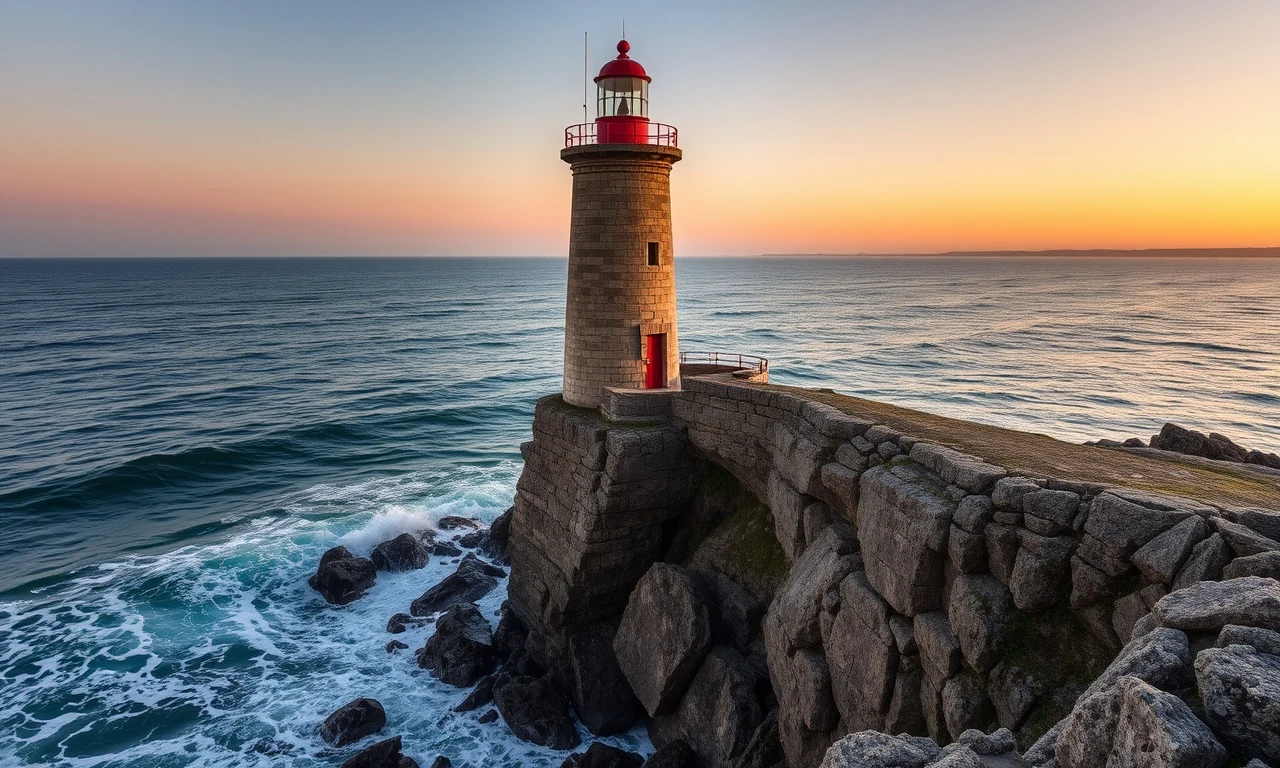
Now the image contains your decisions: the stone is weathered, the lantern room is red, the cliff and the dawn and the waves are all there. Layers 1–3 control CONTENT, and content is now solved. But look at the treatment — the light is pretty in an unremarkable way, the framing is conventional. That is because style, lighting and camera are still unwritten, so the model is still averaging them.
Stage 3 — add style, lighting, camera:
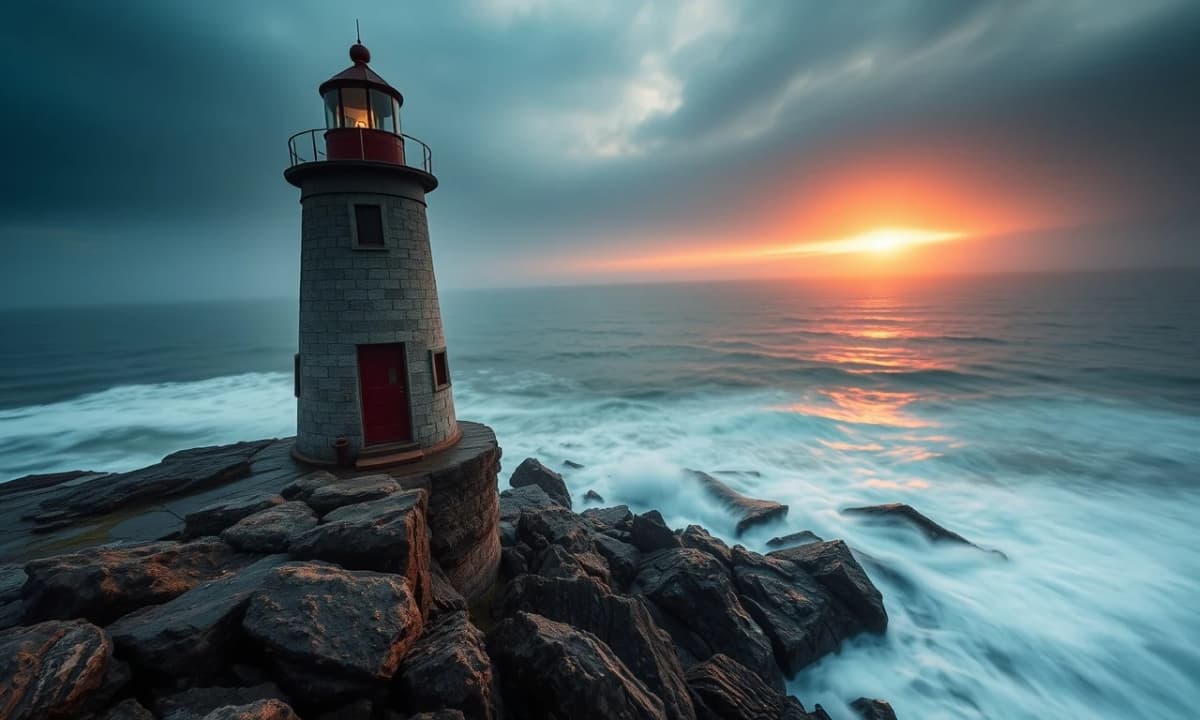
a weathered stone lighthouse with a red lantern room, standing on a rocky cliff edge at dawn, waves crashing on the rocks below, cinematic photograph, warm golden-hour rim light breaking through sea mist, long-exposure silky water, wide-angle shot from below, high detail
a weathered stone lighthouse with a red lantern room, standing on a rocky cliff edge at dawn, waves crashing on the rocks below, cinematic photograph, warm golden-hour rim light breaking through sea mist, long-exposure silky water, wide-angle shot from below, high detail
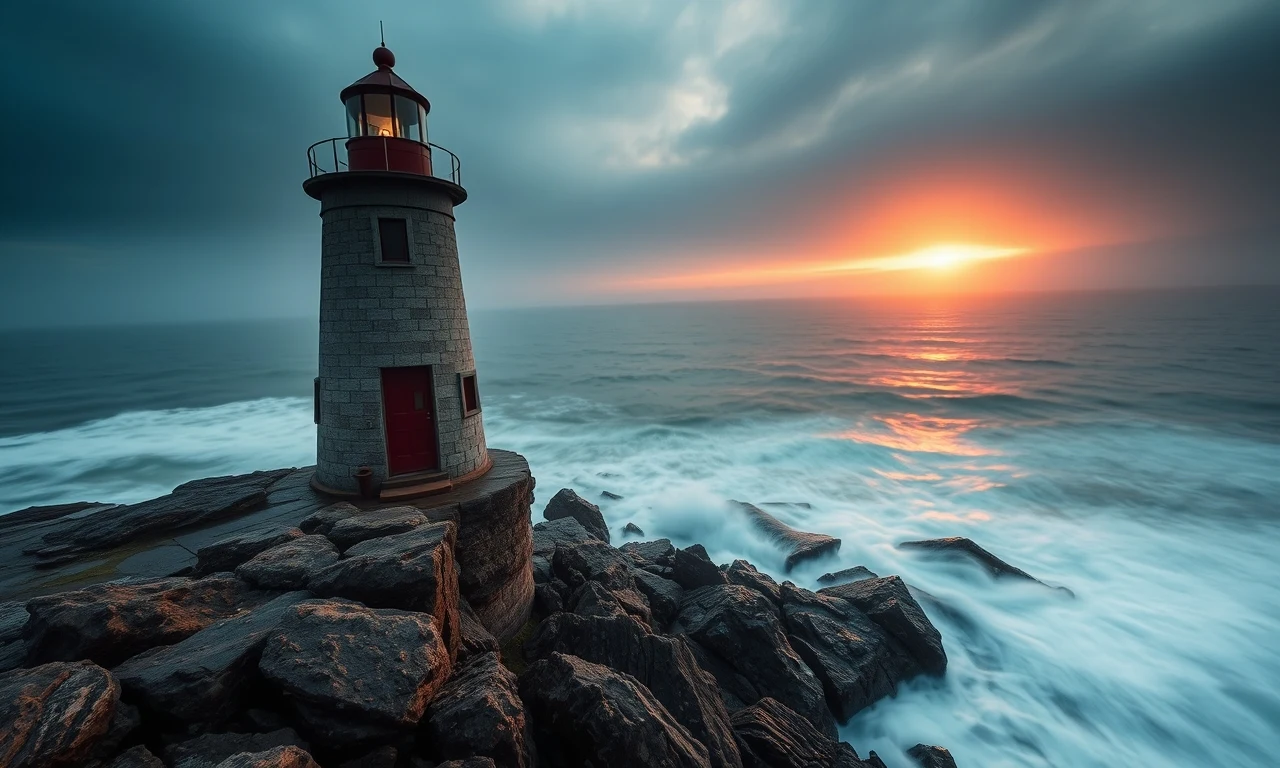
This is the jump people pay for, and it cost fourteen words: the mood, the mist, the silky long-exposure water, the sun burning through the clouds, the dramatic grade. Layers 4–6 control TREATMENT, and treatment is what separates a render you scroll past from one you save.
Two honest observations from this run, because they are lessons in themselves. First, the prompt asked for a "wide-angle shot from below" and got a wide but slightly elevated view — camera instructions are suggestions, not commands, and the fix is to keep the instruction and render again rather than to pile on more camera words. Second, compare the stages closely: the door colour and the exact shade of the lantern room drift between images. Each render is independent — a prompt buys you a distribution of images, not one repeatable picture. Both of these are normal, and knowing they are normal is half the craft.
Working habit: render two or three per prompt, and when iterating, change ONE layer at a time. If you change the lighting and the style together, you cannot tell which change did what.
Layer by layer: what to actually write
Vocabulary is what turns the formula from a checklist into a tool. These are the words that reliably move each layer, on every mainstream engine:
Order and emphasis
Engines weigh early words more heavily than late ones, so front-load the subject and its defining detail, and let treatment layers trail. Beyond ordering, some engines offer explicit emphasis: Stable Diffusion can weight any term with (term:1.3) syntax — covered properly in our Stable Diffusion prompts guide — and Midjourney shapes results with parameters like --stylize, covered in the Midjourney prompts guide. On engines with no weighting (Flux, DALL·E 3), word order and repetition are your only emphasis tools, which is one more reason to keep prompts lean.
Five mistakes that flatten your images
Same idea, different engines
The six layers are universal; the packaging is not. The same layered lighthouse prompt would be phrased differently per engine:
| Engine | How it likes its prompts |
|---|---|
| Midjourney | Short evocative phrases + parameter flags (--ar, --style raw) |
| Stable Diffusion | Comma-separated tags, (weighted:1.2) terms, plus a negative prompt |
| Flux | One dense natural-language paragraph, materials and camera spelled out |
| DALL·E 3 | Conversational scene description, as if briefing an illustrator |
Shortcuts: let a tool write the layers
Once you understand the layers, you can also delegate them. Our free text to prompt enhancer takes a one-line idea and expands it into a fully layered prompt — no signup — which is a fast way to see the formula applied to your own subjects. If you are starting from an image rather than an idea, the image to prompt tool reverse-engineers a layered prompt from any picture. And the AI image generator that produced every render on this page gives you free daily images to practise with.
Write the subject, decide the details, place it in time, choose its medium, light it, frame it. Six decisions — and the difference between the first lighthouse on this page and the last one.
I
ImaginPrompt
Prompt Engineering Team
Frequently Asked Questions
How long should an AI image prompt be?
Long enough to make the decisions you care about, and no longer. In practice that is usually one to three sentences — subject and detail, setting, then style, lighting and camera. Past a certain density the terms start fighting each other: twenty style keywords do not give you twenty styles, they give you mud. If a short prompt already produces what you want, adding more words mostly adds randomness.
Why does the same prompt give me a different image every time?
Generation starts from random noise, so every render is a fresh roll of the dice constrained by your prompt. The prompt controls what the image contains; the randomness decides the rest. That is why the practical workflow is two or three renders per prompt — you are sampling from a distribution, not requesting a file.
What's the difference between style and medium?
Medium is what the picture physically pretends to be — a photograph, an oil painting, a 3D render, a pencil sketch. Style is how that medium is handled — cinematic, minimalist, impressionist, studio-lit. 'Oil painting' is a medium; 'impressionist oil painting with loose brushwork' is a medium plus a style. Naming both is one of the fastest ways to make a render feel deliberate.
Do capital letters or punctuation matter in prompts?
Capitalisation does not matter to any mainstream engine. Punctuation matters only as a separator: commas are how most models chunk your prompt into ideas, so use them between concepts. Keep one idea per comma-separated phrase and you will rarely have parsing problems.
Should I write keywords or full sentences?
It depends on the engine. Stable Diffusion responds well to comma-separated tags and supports weighting individual terms. Flux and DALL·E 3 prefer dense natural-language description. Midjourney sits in between — short phrases plus its parameter flags. The six-layer formula in this guide works for all of them; only the packaging changes. See our per-engine guides for the details.
Do negative prompts work on every model?
No. Stable Diffusion has a dedicated negative field and benefits from it enormously. Midjourney has the --no parameter. Flux and DALL·E 3 have no negative channel at all — with those, you describe what you DO want instead. Our negative prompts guide covers what belongs in one and when it helps.
How do I keep a character consistent across images?
This is genuinely hard with prompts alone, because every render is independent — as our worked example shows, even the lighthouse's door colour drifted between stages. Lock down the describable facts (age, hair, clothing, palette) in identical wording every time, and use engine-specific reference features where they exist, like Midjourney's --cref. Expect drift; plan to select from several renders.
What aspect ratio should I use?
Decide by destination, not habit: 16:9 or 3:2 for scenes and wallpapers, 1:1 for avatars and product shots, 9:16 for phone wallpapers and stories. Aspect ratio changes composition, not just the crop — a wide canvas invites the model to build an environment, a tall one favours a single subject.
Can I practise without installing anything?
Yes — the renders in this guide came from our free in-browser AI image generator, which needs no signup for your first images each day. Write a prompt with the six layers, render it, change one layer, render again, and compare. Ten minutes of that teaches more than any list of magic words.
You Might Also Like
AI Reverse Image Search Prompt: Decoding the Art
Master the art of the ai reverse image search prompt to decode stunning AI art. Learn to recreate any image with expert prompt engineering tips.
Read More
Negative Prompts: A Practical Guide (2026)
Read More