Prompt Engineering•10 min read
Video to Prompt: Turn Any Video Into an AI Prompt
Some of the best prompts are not written — they are extracted. A film scene, a drone clip, a piece of b-roll with exactly the light you want: footage already contains the subject, the motion, the camera work and the grade, which is precisely the information a good prompt has to spell out. This guide shows how video-to-prompt extraction works under the hood, runs a real launch video through our free video to prompt tool, and quotes every output exactly as the machine produced it — including the parts you would want to fix.
How video-to-prompt extraction actually works
You cannot hand a video file to an image model, so the tool builds something an image model CAN read: a storyboard. When you load a clip, six keyframes are sampled across its duration — at 10%, 25%, 40%, 60%, 75% and 90% — and composited into a two-column grid, in order. That grid goes to a vision model with instructions to read it as a temporal sequence, not six separate pictures: track the subject's motion across frames, infer camera movement from perspective shifts, follow how the light evolves, then write one prompt that carries the whole arc.
One detail of this design is worth calling out: the sampling happens in your browser. The video file itself is never uploaded — only the small composite storyboard is sent for analysis. Beyond the privacy, this is why a 200MB clip extracts as fast as a 5MB one.
A real extraction, start to finish
For a demonstration we wanted footage with everything a prompt cares about — a strong subject, real motion, camera movement and evolving light — and no licensing questions. NASA's press-site tracking shot of the Artemis I night launch (public domain, credit NASA) is all of those at once. Here is the exact storyboard the tool built from it:
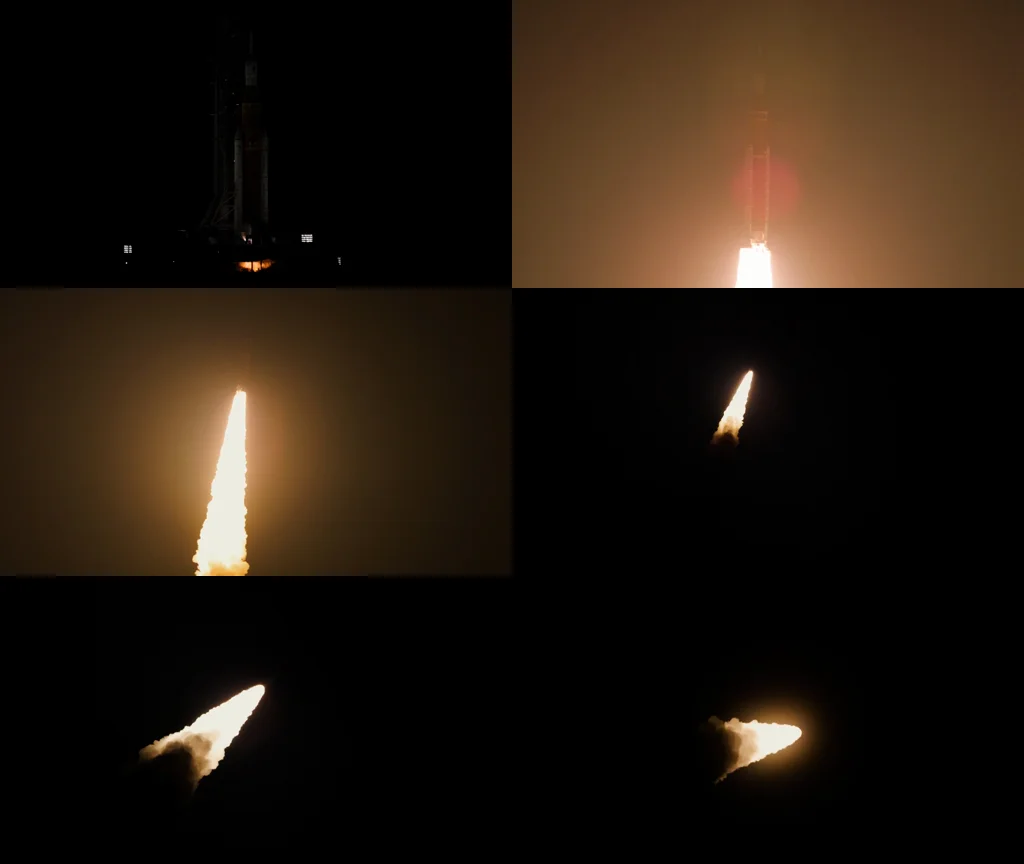
Notice what the grid preserves: the first frame is a rocket standing dark on the pad, the second is engulfed in ignition glow, and the last four track a flame climbing away into black sky. A single still could never tell that story — the sequence is the information. Extracted with the Midjourney target, verbatim:
Midjourney target — verbatim output:
--v 6.0 --style raw --ar 16:9 A rocket ship ascends vertically through space against a dark sky, its bright flame illuminating the surrounding environment. As the rocket gains altitude, the flame grows larger and more intense, casting an orange glow over the scene. The camera pans up to follow the rocket's trajectory, capturing the dynamic movement and energy of the launch.
--v 6.0 --style raw --ar 16:9 A rocket ship ascends vertically through space against a dark sky, its bright flame illuminating the surrounding environment. As the rocket gains altitude, the flame grows larger and more intense, casting an orange glow over the scene. The camera pans up to follow the rocket's trajectory, capturing the dynamic movement and energy of the launch.
Read it against the storyboard and the analysis holds up: the ascent, the growing flame, the orange cast, and — this is the part a still image could never give you — "the camera pans up to follow the rocket's trajectory." That camera line was inferred from how the framing shifts between cells. Also note the aspect ratio: the clip is 16:9, and the extractor carried that through as --ar 16:9 automatically.
Two honest corrections before you would paste this into Midjourney, because the raw output is a first draft, not gospel. First, the parameter flags landed at the START of the prompt — Midjourney wants them at the end, so move '--v 6.0 --style raw --ar 16:9' to the tail. The extractor is instructed to end with them, but the model occasionally leads with them instead. Second, "through space" is an embellishment: the rocket is in the night sky, not orbit. Vision models routinely upgrade dark backgrounds to "space" — delete the claim and keep the light.
The same storyboard through the Flux target, which asks for one dense descriptive paragraph, produced this (we have trimmed the model's conversational opening line — "Here's a meticulously crafted..." — and quote the rest as-is):
Flux target — output (opening filler trimmed, disclosed):
In the dark expanse of space, a rocket ship pierces through the void with an ethereal glow, its trajectory unfolding like a celestial ballet. As it ascends, the camera pans up to reveal a majestic launchpad, bathed in a warm orange light that casts long shadows across the rugged terrain. The rocket's body glows with an otherworldly intensity, its flames illuminating the surrounding landscape like a fiery halo. Against the stark blackness of space, the rocket leaves behind a trail of glowing exhaust, etching a path of golden light through the darkness. With each passing frame, the rocket gains speed and altitude, leaving the earthbound structures far below, until finally, it disappears into the vastness of the cosmos, leaving only a faint smudge of smoke and a lingering sense of wonder.
In the dark expanse of space, a rocket ship pierces through the void with an ethereal glow, its trajectory unfolding like a celestial ballet. As it ascends, the camera pans up to reveal a majestic launchpad, bathed in a warm orange light that casts long shadows across the rugged terrain. The rocket's body glows with an otherworldly intensity, its flames illuminating the surrounding landscape like a fiery halo. Against the stark blackness of space, the rocket leaves behind a trail of glowing exhaust, etching a path of golden light through the darkness. With each passing frame, the rocket gains speed and altitude, leaving the earthbound structures far below, until finally, it disappears into the vastness of the cosmos, leaving only a faint smudge of smoke and a lingering sense of wonder.
Richer material and lighting language — "warm orange light that casts long shadows", "trail of glowing exhaust, etching a path of golden light" — which is exactly what Flux wants. It also embellishes harder (that "celestial ballet" is doing no work, and "space" appears again). The editing rule is the same on every engine: keep the light, the motion and the camera; cut the poetry and anything your clip does not actually show.
Working habit: treat an extraction like a transcript, not an essay — verify every claim against the footage, delete what is not there, keep the temporal and camera language. That language is the hardest part to write by hand, and it is the part the extractor is best at.
What a video prompt has that an image prompt doesn't
If you have read our guide on writing prompts from scratch, you know the six layers of a still-image prompt. Video adds a seventh dimension — time — and it shows up in three specific kinds of language:
These three are exactly what video generators want. A still-image prompt pasted into a video model produces a static shot; a prompt with motion, camera and arc gives it something to animate.
Choosing a clip that extracts well
Where to use an extracted prompt
For stills, paste the output straight into your generator — the Midjourney and Flux guides cover the per-engine details, and our free image generator will render the Flux format directly. For video models — Sora, Runway, Kling and their peers — an extracted prompt is a genuinely strong starting point precisely because it already contains motion and camera language; add duration and any dialogue or sound direction, which no storyboard can carry. And if what you actually have is a single still rather than footage, that is a different tool and a different guide: image to prompt.
The whole loop takes under a minute: load a clip into the video to prompt tool — free, no signup — read the extraction against your footage, cut the embellishments, and keep the camera moves you would never have thought to write.
I
ImaginPrompt
Prompt Engineering Team
Frequently Asked Questions
Does my video get uploaded to your servers?
No — and this is worth understanding, because it is unusual. The frame sampling happens in your browser: six keyframes are captured locally and composited into one small storyboard image, and only that storyboard is sent for analysis. A two-hundred-megabyte clip results in an upload of a few hundred kilobytes, and the footage itself never leaves your machine.
What video formats work?
Anything your browser can play — MP4 is the safe universal choice, and WebM works in every modern browser. Because the sampling uses the browser's own video player rather than a server-side decoder, if the clip plays for you, it can be extracted.
How long can the video be?
The six sample points are taken at fixed percentages of the duration (10% through 90%), so any length technically works. But length is not the real constraint — consistency is. A three-minute clip of one continuous scene extracts beautifully; a thirty-second montage with five cuts gives the analyzer five unrelated scenes to average together.
Why six frames?
It is the practical sweet spot for temporal analysis. Fewer frames lose the arc — you cannot detect camera movement or lighting evolution from two stills. Many more frames shrink each cell so far that fine detail disappears at the vision model's input resolution. Six frames in a 2x3 grid keeps every frame readable while covering the whole clip.
Can I get the prompt formatted for Stable Diffusion or Flux?
Yes — the tool has a target selector. General and Midjourney targets produce flowing sentences with motion and camera language; Flux produces one dense descriptive paragraph; Stable Diffusion produces the tag-style format with a negative prompt appended. The underlying analysis is the same; only the packaging changes.
Does it work on vertical (9:16) video?
Yes. The tool detects the clip's real aspect ratio and carries it into the output — a vertical clip extracted for Midjourney ends with --ar 9:16 rather than a landscape default, so the recreated stills match the original framing.
Can I extract a prompt from a movie or TV scene?
Technically yes — the extractor describes what it sees. What you get is a description of the scene's visual style: lighting, palette, camera work, composition. Using that as a study of a cinematographic look is exactly what the tool is for; recreating identifiable characters or protected imagery is on you to keep on the right side of the platform rules you generate with.
The output mentioned something that isn't in my video. Why?
Vision models embellish, especially around low-light footage — our own demo described a night sky as 'space'. Treat the output as a strong first draft: verify each claim against your clip, delete what is not there, and keep the temporal and camera language, which is the part that is hardest to write by hand.
You Might Also Like
How to Write AI Image Prompts (2026 Guide)
Read More
AI Reverse Image Search Prompt: Decoding the Art
Master the art of the ai reverse image search prompt to decode stunning AI art. Learn to recreate any image with expert prompt engineering tips.
Read More